
Project management for non-project managers: how a WBS is created
Have you ever been part of a project without a clear structure? Tasks are assigned haphazardly, deadlines are missed, and priorities shift constantly. Meanwhile, the scope of work expands uncontrollably, much like an unattended sourdough starter. Without a straight-forward, understandable approach, teams struggle with unclear responsibilities, poor estimates, and ineffective risk management.
Any time we involve more than one person in a project, and anytime that project is more complex than one person can carry around in their head, having a way to organize, communicate, and track that project becomes just as important as doing the work. Otherwise, as you know, things can very quickly descend into chaos.
A Work Breakdown Structure (WBS) solves these issues by providing a clear framework for organizing work into manageable chunks.
Getting Started
One way to begin creating a structure is through a Product Breakdown Structure (PBS). The PBS focuses on the product and its components before figuring what else, besides parts, is needed to build it. Afterward we can dive into all the work needed to make that product real. We’ll explore different ways to organize different types of work in later posts.
- Identify the Final Deliverable – Start by defining the project’s goal (product or service).
- Break It Down into Major Components – Identify the key deliverables that make up the final product.
- Decompose Each Component Further – Continue breaking the product into smaller elements until each can be assigned, estimated, and tracked.
- Validate – Confirm that every necessary piece of work is included, and that what is included is enough to get it done.
- Review with the Team – run it past your team (if you haven’t already done so), and stakeholders (community, customers, owners, suppliers, etc.) to verify accuracy and feasibility. Even the smallest projects are better for having to explain yourself to someone else. For the biggest projects, skipping this step is bad.
Yes, building a WBS is pretty much that simple. Not easy — the bigger the project the more complex it will get. But it employs some straight-forward tools and techniques to get a deep, complete, and usable understanding of the work. Let’s make it more real with an example:
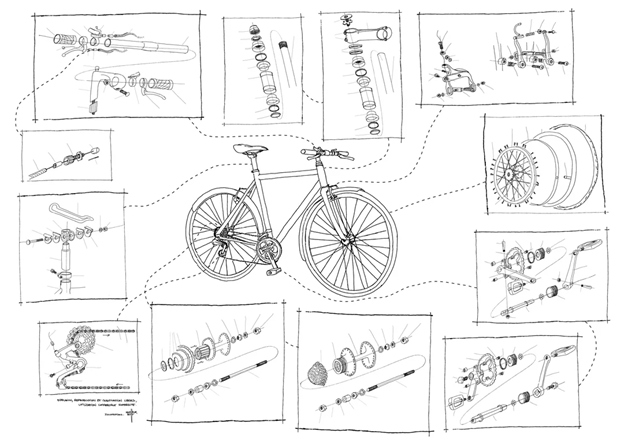
Original Credit: http://www.monsieurpetit.com/bikeExplodedView/velo_vueEclatee.html
Example: Building a Bicycle
You’re going to escape the rat race and start your own company. You’ve always been big into mountain biking, and you’re good with your hands, so your idea is to start building custom mountain bikes[1]. Even better, you’re going to start welding frames and assembling mountain bikes in your garage. We can start by creating an ‘org chart’ style diagram of all the bits and pieces that go into a bike:
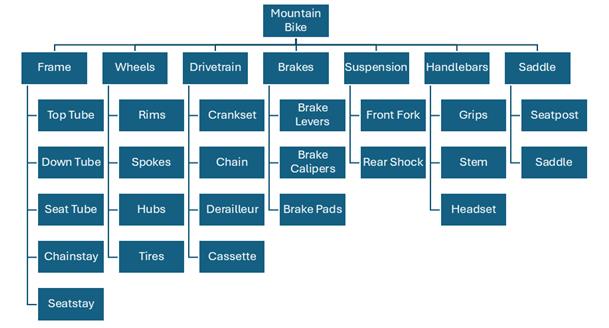
A ‘product breakdown structure’ is a great starting point. It gives us the physical bits and pieces we’re going to need, but that’s not all there yet. As you look over the chart, think about what else needs to be done to build a bike?
What about paint? Are you going to manufacture your own tires, rims, and levers? Probably not, so you’re going to need to spend time sourcing and purchasing them. Who’s going to design these custom bikes, and deal with customers? If you’re going to be welding, you’ll need a welder machine and the space to put it in. And so on. You’re going to keep it simple for now. You’ve decided to manufacture and paint the frames yourself and outsource everything else.
Turns out that the project of manufacturing custom mountain bikes in your garage has a lot of moving parts (pun intended). Pretty soon you’ll run out of space on the page, so let’s turn it sideways and add some of the bits that are missing:
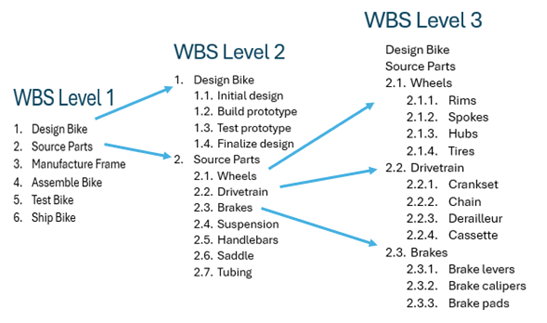
…and so on. Number all the chunks so you can keep track of them. While this example isn’t complete, it’s a good start. We can imagine, for example that 2.3 Manufacture Frame could be broken down into 2.3.1 Cut Tubing/2.3.2 Weld Frame/2.3.3 Paint Frame. Those might be broken down again (more on this later).
You might decide 5. Test Bike is enough, or you might have a detailed QA/QC process in mind. In which case it become 5.1. Create QA-QC Plan/5.2. Inspect Bike/5.3. Test Ride/5.4. Write Report. The appropriate level of detail for your project is for you (or your team) to decide.
This is what PMs call ‘expert opinion‘. If that’s not you, then you’ll need to find your own expert for that part of the project.
Decomposition
If a WBS is the backbone of a project, decomposition is its beating heart. Breaking the work down to the right level of detail, and being able to estimate cost and duration for each part, is what defines a WBS. After this, you’ll be able to schedule, budget, and assign the work.
Decomposition is a simple, powerful technique. You’re going to focus on the chunks of work that haven’t been broken down into smaller pieces. In PM-speak it’s a ‘work package’: packages of work that don’t have any smaller chunks, and for which we can determine its duration and cost.
In our previous diagram, 2.1.1. Source Rims or 1.2. Build Prototype are examples of work packages. They don’t have any smaller parts (in PM-speak they have no ‘children’), although they might produce some as we go through each one.
For every work package in your WBS:
- If you can estimate its cost and duration, go to the next work package
- If you can’t
- Break it down into smaller pieces
- Try to estimate cost and duration for each new ‘child’
- Go back to 1.
You might have to make a couple of passes through the whole before you’ve got everything. You might even try to organize the work in a different way, and that’s okay. Finding the right level of detail, and making sure you’ve got everything, and haven’t duplicated anything can take a couple of tries.
What to Avoid
At this point it will be very tempting to do things like write down start and end dates, or assign the work to someone, or starting thinking about risks and obstacles. While these are considerations, and will affect how you do the work, try to avoid diving deeply them just yet.
They are separate techniques and should be done separately. Once you done those things (sequencing, scheduling, assigning), you should and will circle back and tweak the WBS. For now park them for later, and focus on estimating (duration and cost.)
Think of it like Hemingway did: “Write drunk, edit sober”. Creative writing and editing are two different activities, that use two different parts of your brain. This is also true creating and editing a WBS. If you try to do both things at the same time you’ll probably just give yourself a headache.
Your Turn
Think back to a project you’ve been on (or maybe even led) that would have benefited from having a work breakdown. Sketch out on a piece of scrap paper (or your app) how you would have organized it differently now. If you’re unsure where to start, try outlining a simple task, such as planning a small event or launching a product. Share your thoughts and experiences in the comments if you want.
Next Time
Next time you’ll learn how to validate your WBS — to make complete, usable, and at the right level of detail.
You read all all the way to the end? Might was well:
Think this might help someone you know? Be a pal & share:
This really helped you?
[1] If this isn’t you, you can play along with your own favourite special interest. I’m using a mountain bike here because almost everyone knows what a bicycle is.
Leave a Reply